Connecting To a Digital World of Work – The Problem with Legacy Technology 

Over the last decade, Enterprise IT has evolved at an unprecedented rate, with each passing year introducing innovative new technologies and solutions. Despite the rate of progress however, many organisations remain committed to running outdated legacy systems, which are thought to account for around 30% of the workplace technology we interact with. 

So, what do we mean by ‘legacy technology?’ Legacy technology has no strict definition, but it generally refers to digital systems considered outdated by modern standards. Such systems are likely to integrate poorly with modern equivalents and may no longer be supported or maintained by their original developers. They are likely to segregate data, and provide no convenient option for the introduction of automation, resulting in inefficient, clunky workflows that demand a high degree of user interaction and manual data handling. 

Here at 4TC, we provide IT support, management and solutions to SMEs across London and the Southeast. Our mission is to empower businesses with secure, optimised and reliable technology that supports sustained business growth and success. One of the ways we deliver on these aims is by helping businesses identify ways to tackle persistent challenges and issues using the best modern solutions. This practice is otherwise known as ‘Digital Transformation.’ 

What is a Digital Transformation? 

A digital transformation is a process or strategy that leverages advancements in technology to fundamentally change how a business operates and delivers value to its customers. The objective of digital transformation is to improve efficiency, competitiveness, customer satisfaction, security and innovation, in an age when digital adoption is so integral to business success.  

We accept that the term ‘digital transformation’ can seem a bit misleading or ambiguous, after all, every business uses digital technology in one way or another. It’s best to think of a digital transformation as an ongoing, evolutionary process rather than a fixed state. Your business embraces digital transformation by considering inefficiencies, bottlenecks and pain points across your digital environment, and devising ways to tackle these issues by aligning processes with up-to-date solutions that perform to the standards today’s employees and customers expect. 

For many businesses, slow, inefficient, and poorly integrated legacy technology is one of the greatest stumbling blocks to undertaking a comprehensive digital transformation. 

Why is Legacy Technology So Problematic?  

Some of the legacy solutions still used by businesses today can trace their roots all the way back to the 70s, 80s and 90s. In those early days of digital evolution, the capabilities available to developers, and as a result, the priorities of the developers themselves, were very different to those of today. The result is applications and programmes that fall significantly short of modern performance and security standards, and that fail to offer the features, capabilities and integrations today’s users expect.  

Despite the obvious shortcomings, legacy systems remain entrenched in the operations of many SMEs, underpinning some of their most critical functions and processes. There is a natural reluctance among many business owners to explore a replacement for these systems, with concerns often expressed about the cost, disruption, risks and learning curve involved in the migration process. As we’ll explore in our next blog, many of these fears are unfounded, with modern alternatives to legacy technologies offering low-impact deployment, minimal upfront costs and intuitive user interfaces that require little in the way of staff training.  

Let’s now look at 6 key reasons your business should consider a replacing its legacy technology sooner rather than later: 

Poor Security 

Many of the legacy applications still in use today date back to the latter decades of the 20th century. This was a period of rapid change, but one in which the cyber security landscape was vastly different to how it is today. Software developers in those days, focussed on speed of delivery, often rushing out programmes that contained significant code flaws and security vulnerabilities. Often, little consideration was given to cyber security, in fact, it could be argued that even Microsoft didn’t take security seriously until the early 2000s. 

This culture of cyber security complacency coupled with software development practices that prioritised speed of delivery over code integrity, resulted in systems laced with security vulnerabilities, and programmes that lack the security controls and protocols today’s hostile threat landscape necessitates. 

Challenging Maintenance 

Using unsupported software is not only risky from a data security standpoint, it can also present distinct maintenance challenges and heighten business continuity risks.  

Outdated coding languages, like COBOL for instance, are becoming increasingly difficult to support, as professionals familiar with it are retiring out of the industry. As such skills become rarer, they subsequently become more expensive, resulting in growing maintenance costs over time.  

Maintenance struggles become particularly acute when business-critical faults that require urgent attention arise. If such a scenario were to develop, you could find yourself struggling to locate an engineer with the niche skills and knowledge required to reinstate your vital systems. In a worst-case scenario, this could leave you without the applications you need to run your business and serve your customers effectively, for a prolonged period of time. 

Data Silos 

A data silo refers to a depository of information that sits in isolation, lacking the ability to be easily shared and integrated with other digital systems or departments within an organisation. Data silos present efficiency challenges and inhibit a business’s ability to harness data as a means to drive value creation.  

Many legacy systems were developed in a time when data analysis was only common practice among larger companies, and when manual data handling was simply considered an unavoidable fact-of-life. As such many systems feature no cross-platform compatibility by default, isolating strategically valuable information, and providing no option for data transfer between systems other than slow, inefficient manual data entry. Siloed data stands as a barrier to collaboration, damages productivity, prohibits the use of business process automation and makes it more difficult to leverage insights from data across your business. 

Hardware Degradation 

Many legacy applications are incompatible with modern IT infrastructure, and as such, require archaic hardware to be maintained to support it. As this hardware ages, components begin slowing down and performance issues escalate into recurring system outages that hamper business productivity and damage staff morale. 

Additionally, outdated hardware is less likely to support or integrate with modern security tools, leaving the data stored in legacy systems more vulnerable to cyber-attacks and data breaches. 

Continuing to operate aging hardware to support your legacy applications could therefore be subjecting your data to an unacceptable level of risk, and leave staff struggling with buggy, slow and unreliable technology that falls well below modern performance standards.  

Damage to Your Business’s image 

Legacy systems are rarely easy on the eye. They look old fashioned because they are old fashioned, often featuring dated user interfaces that lack the finesse and crisp graphics found on modern systems. Using a legacy system in any capacity, be it public-facing or not, may portray your business as stuck-in-the-past and reluctant to innovate, damaging your image, and eroding confidence in your service or product offering. 

Dated technology can also impact employee satisfaction. Slow, unreliable and unintuitive technology can leave staff feeling demoralised, and can make it harder to deliver a high-quality customer experience, particularly in embarrassing situations where customers are aware of the issues and limitations of your technology.  

By operating legacy technology, you leave your business vulnerable to reputational damage that could see you lose the trust of customers, and you run the risk of missing out on new opportunities and revenue streams. 

Compliance Becomes an Uphill Struggle 

Depending on the type of information your legacy technology hosts, you could find it very difficult to take the steps necessary to achieve compliance with data protection regulations like UK GDPR.  

Under such regulations, data controllers are required to defend the integrity, confidentiality, and availability of personal information, using a range of technical and organisational controls and measures, including the likes of firewalls, anti-malware measures, user access controls, data backups and rigorous authentication protocols. Due to a lack of centralised oversight and widespread compatibility issues with modern security tools, legacy technology makes satisfying the requirements of leading data protection regimes an uphill struggle. This could leave sensitive data susceptible to misuse, loss, theft, accidental deletion, or unauthorised access, and could result in fines issued against your organisation for non-compliance. 

Conclusion 

From security vulnerabilities that expose data to online threats, to data silos that present obstacles to automation and collaboration, legacy technology can represent a serious barrier to running a secure, productive, resilient and compliant operation that supports the growth ambitions of your business. By embracing digital transformation, you create a synergy between your technology processes and people, enabling a productive, secure and streamlined workplace.  

In our next article we introduce some of the compelling modern alternatives to legacy technology and explore some of the benefits that businesses can unleash by undertaking a digital transformation.  

4TC Managed IT Services – Uniting People, Processes and Technology 

Secure, stable and optimised IT infrastructure is critical to the success of all businesses in our information age. 4TC helps businesses across London and the Southeast realise their potential through the delivery of expertly managed IT services and support, and solutions that solve business challenges by achieving perfect alignment between people, processes and technology. Get assistance with your IT challenges today by getting in touch, we’ll be glad to assist you!  

Microsoft is testing an AI-powered image creator for Windows 11 Paint

Based on OpenAI’s DALL-E text-to-image platform, Paint Cocreator will conjure up images in Windows Paint based on your descriptions.

Those of you who’ve ever struggled to draw your own artwork in Microsoft Paint will soon be able to turn to AI to automatically generate your desired images.

In a Windows Insider blog post published Wednesday, Microsoft announced a new AI-powered tool for the Paint app in Windows 11 that will create images for you. Known as Paint Cocreator and based on OpenAI’s DALL-E text-to-image platform, the feature is currently on its way to Windows Insiders.

Like other AI-based image generators, Paint Cocreator will cook up images based on your descriptions. You can submit anything from a few general words to a couple of sentences. But you’ll want to be as descriptive as possible to improve your odds of getting just the right image.

You can also select a particular style of art. When you’re ready, the tool will create and display three different images from which to choose. Select the one you like and you can then fine-tune it in the Paint canvas if you wish.

To let you use Cocreator, however, Microsoft is imposing a credits system as virtual currency, according to its support page for the tool.

By Joining Cocreator, you start you off with 50 credits. Each time you create an image, one credit is used. You can always see how many credits you have left by checking the bottom right area of the Cocreator pane.

Microsoft didn’t explain what would happen if you run out of credits and need more. But hopefully that will get ironed out before the tool hits the release version of Windows 11, assuming this credits system sticks around.

To ensure that Cocreator is being used responsibly, Microsoft will also employ content filtering. The aim here is to prevent people from creating images that are considered harmful, offensive, or inappropriate. The content filter is based on certain standards, such as human dignity, diversity, and inclusion, according to Microsoft.

With all the buzz and interest surrounding AI, image generators have taken off among people who need to generate drawings, paintings, artwork, and other types of graphics. OpenAI offers its DALL-E image creator on which other tools are based. The company is currently testing a new version known as DALL-E 3.

Microsoft’s DALL-E-powered Bing Image Creator works as a standalone tool and as part of its Bing AI chatbot. Other popular tools include MidjourneyStable Diffusion, DreamStudio, and Craiyon.

To try Cocreator at this point, you’ll need to be registered with the Windows Insider program for Windows 11. You’ll also need to be running the Dev or Canary build of Windows 11. And for now, the tool is available only in the US, UK, France, Australia, Canada, Italy, and Germany.

Make sure you’ve downloaded and installed the latest updates for your Windows 11 build. Once Cocreator is accessible, you’ll still need to join a waitlist to use the tool as Microsoft is rolling it out slowly at first. To do this, click the Waitlist button in the Cocreator pane when the tool shows up in your build. You’ll receive an email notice when you’ve been approved to use it.

Source: Microsoft is testing an AI-powered image creator for Windows 11 Paint | ZDNET

The IT Support Dilemma: Your Ultimate Guide to Business Survival

Are you feeling overwhelmed with all the technical problems in your business? Trying to manage IT issues on top of everything else can be extremely stressful, but it doesn’t have to be. This guide covers actionable advice on how to handle typical IT support dilemmas so that you can focus your time and energy on what matters most: growing your business.

You’ll learn tips and tricks for budgeting resources, finding reliable help, preventing network security threats, and much more – allowing you to build a strong foundation for success. So fasten your seatbelt as we dive deeper into the world of successful IT strategies!

Understanding the IT Support Dilemma

As technology continues to advance, businesses are increasingly reliant on IT support to ensure their operations run smoothly. However, with the IT support dilemma, businesses must navigate the challenge of providing adequate tech support to employees while managing costs. 

Lackluster IT support can lead to lost productivity and a potential loss of customers, making it essential for businesses to confront this challenge head-on. Investing in effective IT support can help businesses stay ahead of the curve and ensure their technology stays up-to-date, reliable, and secure. Whether it’s through an in-house IT team or outsourcing to a third-party provider, confronting the IT support dilemma is essential for any business that wants to remain competitive in today’s tech-driven landscape. Plus, with the right IT support, your employees can focus on their core responsibilities without getting bogged down by technical issues, a win-win situation for everyone involved.

How To Set Up Your IT Support System

Setting up an IT support system can be a daunting task, especially if you’re not familiar with the process. However, it’s undeniable that a well-planned support system can make all the difference when it comes to efficiency and issue resolution. The first step in the process is evaluating your current setup. Take a look at what’s currently in place and determine what’s working and what’s not. Once you have an understanding of your current situation, it’s time to explore the different options available. 

From hiring in-house support to outsourcing to a third-party vendor, there are pros and cons to each approach. Furthermore, when it comes to outsourcing, you can always find a guide to outsourcing IT support online. That way, you can make an informed decision that is best for your business. When making your decision, consider your budget, business needs, and long-term goals. With the right IT support system in place, you’ll be able to focus on what really matters – growing your business.

Secure Your Network

Cybersecurity is a growing concern for individuals and businesses alike. With the increased use of technology and the internet, it’s more important than ever to secure your network and protect your data from malicious attacks. 

Best practices for strengthening cybersecurity include regularly updating your software and operating systems, using strong and unique passwords, implementing antivirus and anti-malware software, and limiting access to sensitive data. Taking these steps and remaining vigilant can only help you with keeping your information safe from cyber threats. Don’t wait until it’s too late to take action – start securing your network today.

Manage Your IT Budget Wisely 

Now, this can be a daunting task, especially when you need to cut costs without compromising on the quality of your operations. However, with the right strategies, you can identify areas where you can reduce costs and optimize your budget without compromising the efficiency of your business. 

One such strategy is to analyze your IT assets and determine which ones are underutilized or obsolete. You can then eliminate or replace them with more cost-effective alternatives. Another useful approach is to leverage cloud computing instead of investing in expensive hardware and software, as it allows you to pay only for the resources you use. Implementing these and other cost-cutting strategies can not only help you manage your IT budget more wisely but also boost your organization’s overall performance and profitability.

Make Use of Automation Tools & Services

Companies that seek to streamline their operations and save time and money are turning to technology to help them achieve those goals. Automation tools can be used in a variety of ways, from automating repetitive tasks to providing data analysis that can help businesses make better decisions. Making use of these tools and services can enable companies to reduce human error, improve efficiency, and ultimately increase their bottom line. 

Furthermore, automation technology is constantly evolving, giving businesses access to even more advanced solutions that can make them more competitive in their markets. Regardless if it’s through automating manufacturing processes or improving customer service through chatbots, there are endless options available to those willing to embrace automation.

Monitor Performance Reliably

Ensuring reliable performance is crucial for any business, which is why tracking performance trends and addressing any issues quickly is essential. By monitoring performance trends, you can identify areas that require improvement and take proactive steps to maintain productivity and efficiency. 

However, it’s not always easy to stay on top of performance metrics, especially if you lack technical expertise. This is where expert support comes in. With the right support, you can have peace of mind knowing that any performance issues will be addressed quickly and efficiently. In turn, this will help you focus on optimizing your business operations and achieving your goals. Therefore, whether you’re dealing with technical issues or simply need some guidance, don’t hesitate to rely on expert support for all your performance monitoring needs.

To sum it up, it is evident that having an effective IT support system in place for your business is a must and one that should not be taken lightly. Taking the time to evaluate your current setup, review different options, secure your network with best-in-class practices, manage your IT budget wisely, make use of automation tools and services, and monitor performance reliably will help take your company from good to great. Don’t forget to enlist the help of expert professionals when you need advanced insight or further assistance addressing matters related to any of these areas. After all, preventing unforeseen problems is much easier than cleaning up a mess once it’s already been made.

Source: The IT Support Dilemma: Your Ultimate Guide to Business Survival (swindonlink.com)

Data-driven cyber: empowering government security with focused insights from data

In recent months, the NCSC has been accelerating its approach to data-driven cyber (DDC). Our goal is to encourage the adoption of an evidence-based approach to cyber security decisions, not only in how we advise external organisations, but also in how we address our own security.

We acknowledge that enterprise cyber security is becoming increasingly complex, and many teams are reluctant to introduce an additional ‘data layer’ due to concerns of becoming overwhelmed. In this blog post, we aim to demonstrate how concentrating on manageable, actionable insights can help teams embrace data-driven cyber security.

Our example showcases a collaboration between two teams within the NCSC:

  • the Vulnerability Reporting Service (VRS)
  • the Data Campaigns and Mission Analytics (DCMA) team

The Vulnerability Management Team leads the NCSC’s response to vulnerabilities, while DCMA use their expertise in data science and analysis to provide the NCSC Government Team with evidence based security insights.

Small actionable insights drive action

Many government teams, including the VRS, gather and manage vast amounts of valuable data. The challenge they face is how to best analyse this, given the misconception that developing any useful insights requires a complete overhaul of existing workflows.

This misconception stems from the idea that implementing DDC involves plugging all data into a complex ‘master formula’ to unveil hidden insights and narratives. However, it’s essential to recognise that, especially in the beginning, DDC should be viewed as a tool for generating ‘small yet actionable insights’ that can enhance decision-making. This simpler and more focused approach can yield significant benefits.

Vulnerability Avoidability Assessment

In the case of the VRS we did exactly that, starting with the data sets that were available to the team and then focusing on a single insight that could be used to have a meaningful evidence-based security conversation.

To this end we created the Vulnerability Avoidability Assessment (VAA), an analytic that uses two internal data sources and one public source to determine what proportion of vulnerability reports were a result of out-of-date software. The data sources comprised of:

  • number of vulnerability reports received by VRS
  • number of reports where out-of-date software was listed as a reason
  • public vulnerability disclosure database

We created this analytic knowing that patch management is one category of vulnerability that could be influenced, and that diving deeper into the link between patch management and the vulnerabilities reported through the VRS would provide us with a security discussion point about how vulnerabilities can potentially be avoided or reduced.

Our analysis

We gained a deeper insight into the impact of unpatched software on government systems by comparing the number of vulnerability reports resulting from outdated software with information from an open source database. This database provided estimates of how long these vulnerabilities had been publicly known, and when patches had become available.

Using the above approach we were able to define an ‘avoidable vulnerability’ as one that has been publicly known for a considerable time, to the extent that a responsible organisation would reasonably be expected to have taken the necessary actions to apply the required updates and patches.

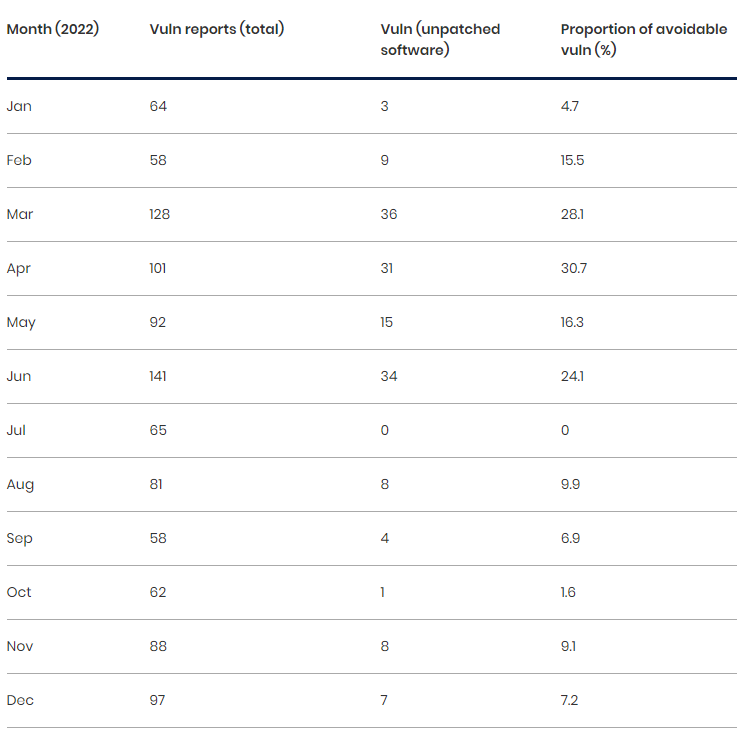
Our analysis of data from 2022 (refer to Table 1, below) revealed that each month the VRS receives a considerable number of vulnerability reports directly linked to software that was no longer up to date. Ranging from 1.6% to a peak of 30.7% of vulnerabilities in a single month, over the course of the year.

TABLE 1. TOTAL NUMBER OF OUT-OF-DATE SOFTWARE REPORTS COMPARED TO THE TOTAL NUMBER OF VULNERABILITY (VULN) REPORTS RECEIVED FOR 2022.

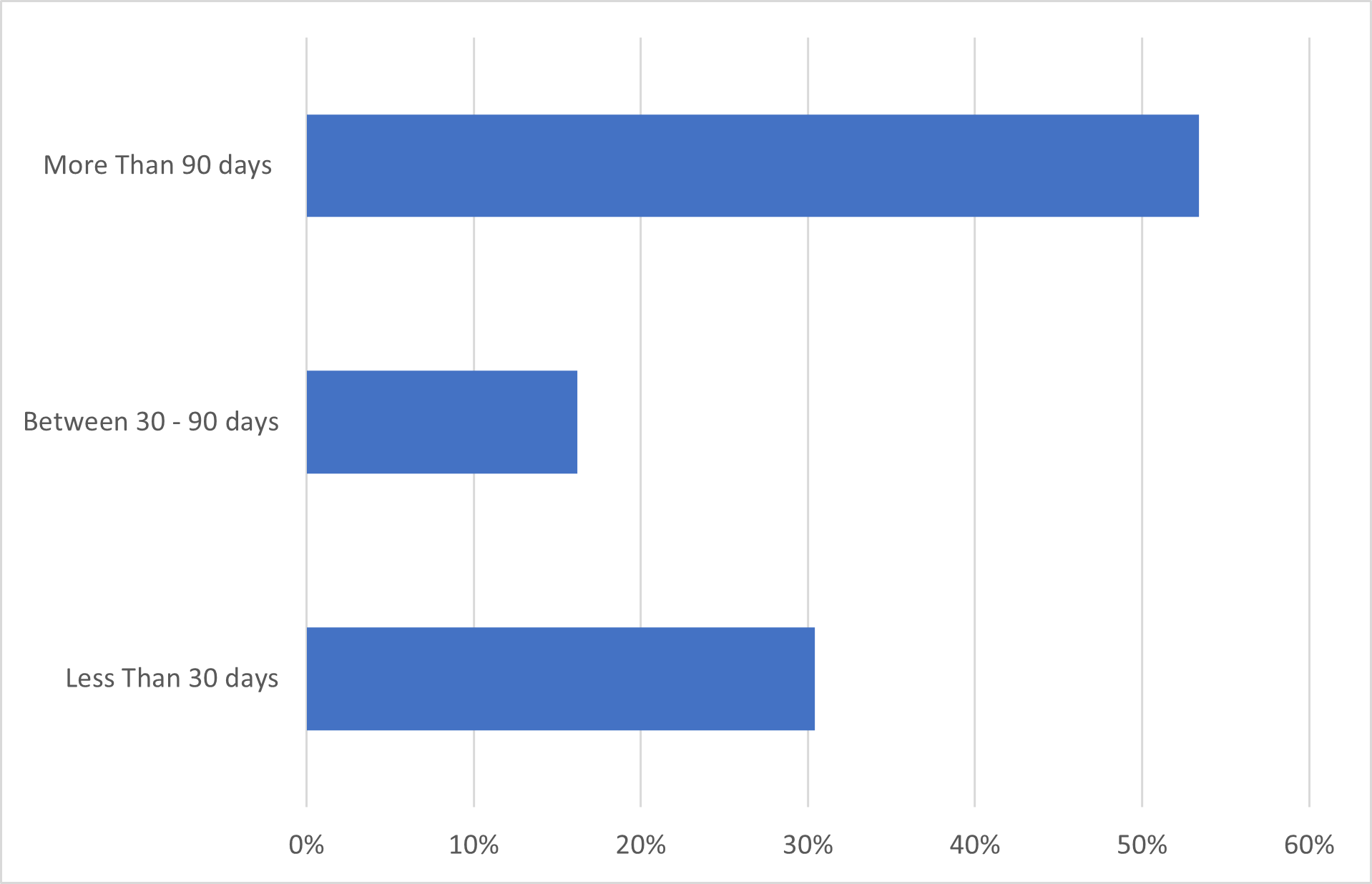
We also investigated how long the software vulnerabilities went unpatched before they were exploited. Referring to NCSC guidance, which recommends applying all released updates for critical or high risk vulnerabilities within 14 days (NCSC Cyber Essentials guidance on ‘Security Update Management’, Page 13), we chose a 30-day buffer as a consistent timeframe for applying patches, regardless of their severity. Separating the timelines into these increments, we found that 70% of outdated software vulnerabilities reported to the VRS were due to software remaining unpatched for more than 30 days (refer to Chart 1, below).

CHART 1. SHOWCASES THE LENGTH OF TIME A VULNERABILITY HAD BEEN IN THE PUBLIC DOMAIN.

This newfound understanding provided the VRS team with sufficient data to have an evidenced based discussion with stakeholders regarding their approach to patch management. Providing the data insights to support a case for meaningfully reducing the number of vulnerability reports received by the VRS against government systems.

Conclusions

The journey towards DDC has highlighted the immense value of leveraging data to make evidence-based security decisions. The collaboration between the VRS and the DCMA team serves as a concrete example of how data can inform decision making. It is essential for organisations to recognise that adopting DDC does not require a complete overhaul of existing systems, but rather the ability to focus on extracting small but actionable insights that can drive behaviours and decisions.

Source: Data-driven cyber: empowering government security with… – NCSC.GOV.UK

Meta announces AI chatbots with ‘personality’

Meta has announced a series of new chatbots to be used in its Messenger service.

The chatbots will have “personality” and specialise in certain subjects, like holidays or cooking advice.

It is the latest salvo in a chatbot arms race between tech companies desperate to produce more accurate and personalised artificial intelligence.

The chatbots are still a work in progress with “limitations”, said boss Mark Zuckerberg.

In California, during Meta’s first in-person event since before the pandemic, Mr Zuckerberg said that it had been an “amazing year for AI”.

The company is calling its main chatbot “Meta AI” and can be used in messaging. For example, users can ask Meta AI questions in chat “to settle arguments” or ask other questions.

The BBC has not yet tested the chatbot which is based on Llama 2, the large language model that the company released for public commercial use in July.

Several celebrities have also signed up to lend their personalities to different types of chatbots, including Snoop Dogg and Kendall Jenner.

The idea is to create chatbots that are not just designed to answer questions.

“This isn’t just going to be about answering queries,” Zuckerberg said. “This is about entertainment”.

According to Meta, NFL star Tom Brady will play an AI character called ‘Bru’, “a wisecracking sports debater” and YouTube star MrBeast will play ‘Zach’, a big brother “who will roast you”.

Mr Zuckerberg said there were still “a lot of limitations” around what the bots could answer.

The chatbots will be rolled out in the coming days and only in the US initially.

Mr Zuckerberg also discussed the metaverse – a virtual world – which is a concept that Mr Zuckerberg has so far spent tens of billions of dollars on.

Although Meta had already announced its new virtual reality headset, Quest 3, the company gave further details at the event.

Meta’s boss described the headset as the first “mainstream” mixed reality headset. Cameras facing forward will mean the headset will allow for augmented reality. It will be available from 10 October.

The firm’s big, long-term bet on the metaverse still appears yet to pay off, with Meta’s VR division suffering $21bn (£17bn) in losses since the start of 2022.

The Quest 3 came after Apple entered the higher-priced mixed reality hardware market with the Vision Pro earlier this year.

Mat Day, global gaming strategy director for EssenceMediacom, said Mark Zuckerberg had “reinvigorated” the VR sector.

“Meta’s VR roadmap is now firmly positioned around hardware priced for the mass market. This is a stark contrast to Apple’s approach which is aimed at the high end tech enthusiast,” he said.

Meta’s announcement came on the same day as rival OpenAI, the Microsoft-backed creator of ChatGPT, confirmed its chatbot can now browse the internet to provide users with current information. The artificial intelligence-powered system was previously trained only using data up to September 2021.

Source: Meta announces AI chatbots with ‘personality’ – BBC News

How AI Can Benefit Small Businesses: How to Get Started with Applying AI 

In our last piece we outlined the two generation of AI that are empowering businesses to achieve more, using less time and resources, as well as some of the many possible benefits that your business can enjoy from using it. For small businesses, getting started with applying AI does not have to be overly complicated. It all starts with mapping technological territories and workflows, identifying the potential for AI-driven solutions to address challenges and add value, and creating a roadmap for implementing these solutions into the business. 

How Many Small Businesses Are Adopting AI?  

A 2022 government report exploring the adoption of the latest generation of AI technologies such as data analytics and machine learning, provides some interesting insights.   

Around 68% of large companies, 34% of medium sized companies, and 15% of small companies have adopted at least one next-gen AI technology. The majority of businesses have adopted or plan to adopt next-gen AI technology in the coming years, and even though adoptions of it are correlated to size, many innovative firms of all sizes are adopting AI today.  

The good news is that in the next few years, it’s unlikely that most small businesses are going to be swept away by competitors using this form of AI, and this is also a great opportunity to start getting ahead and laying out a roadmap, including for simpler business process automations. On the other hand, further down the line, adopting the next generation of AI will become increasingly necessary to maintain a competitive edge.  

So, how can your business get started with adopting AI to automate its defined business processes and to access more advanced features such as data analytics? Here are the three key steps:  

Map Your Technological Territory and Workflows 

Start by mapping out the technology that you use to undertake your workflows and list what automations could be possible within them. Some items on this list may be more viable for your business than others, but that’s okay, the next step will examine if they can be realised or not. There are other more certain opportunities within the technology that you might already be using. For example, many businesses are missing on some low-hanging fruit in their Microsoft 365 environment, which offers automation capabilities via its Power Automate tool.  

By mapping your workflows and the tools involved in them, you can start to create a list of ideas for either enhancing or automating aspects of your workflows to empower your business.  

Find and Assess AI-Driven Solutions 

This step involves doing your homework and looking around for tools such as software, that can be used to automate or empower aspects of your workflows. You may be surprised by what you find! This research can pay off by helping you to find solutions, understand how they work and how compatible they are with your business, and with these insights, a better understanding of how they can be integrated into your business.  

Assessment will also be crucial, as it is not always easy to quantify the benefit of a new technology solution without careful consideration. By comparing what new solutions can offer, and how they can benefit your business, you will be able to prioritise the solutions that stand to contribute the most value. 

Create A Roadmap  

You may already have a technology roadmap that AI-driven solutions can be integrated into, or perhaps you may want to make a roadmap from scratch. Either way, the roadmap lays out the timelines, steps, and considerations for implementing AI-driven solutions in your business in a way that will minimise disruption. The roadmap should be segmented into projects for each implementation, that will allow you to work with stakeholders, budget appropriately, prepare your business, and ensure a smooth series of implementations as your roadmap unfolds.  

The roadmap will help you to prioritise the solutions to implement and provide a realistic timeline for preparing your business to integrate it fully. In all, it’s your practical plan for realising the benefits of AI in your business.  

We hope that this piece has been a useful guide for getting started on your journey with AI. Remember, there is plenty of time to undertake careful planning to prepare your business for the transition, and many other businesses will likely be in a similar position. That said, the sooner you can get started, the more your business will be able to get ahead of the competition and use AI as a lever for achieving more profitable growth.  

We Are 4TC Managed IT Services 

4TC can support you with all the services you need to run your business effectively, from email and domain hosting to fully managing your whole IT infrastructure. Setting up a great IT infrastructure is just the first step. Keeping it up-to-date, safe and performing at its peak requires consistent attention. 

We can act as either your IT department or to supplement an existing IT department. We pride ourselves in developing long-term relationships that add value to your business with high quality managed support, expert strategic advice, and professional project management. Get assistance with your IT challenges today by getting in touch, we’ll be glad to assist you! 

Transitioning From ISDN To Cloud Telephony: A Step By Step Guide 

In our last piece, we discussed the rise and fall of ISDN as a telephony solution for businesses and contrasted its growing disadvantages with the benefits of modern solutions such as VoIP, with the example of the Microsoft Teams Phone System. With ISDN and PSTN networks being completely taken offline by 2025, it’s essential for businesses to prepare to transition. In this piece, we will give a general step by step guide for migrating from ISDN-based telephony to a cloud-based telephony solution.  

Undertaking the Transition: A Step-by-Step Guide 

The simplicity of leveraging many cloud solutions has made arranging the transition to a new solution generally easier than it used to be, however, it’s still important to map your telephony territory and to ensure that a smooth transition can be undertaken for your business.  

Telephony Assessment  

Firstly, although ISDN is an outdated solution, no two businesses are the same. There may be some (albeit rarer) cases where keeping ISDN telephony continues to be more cost-effective for now.  

Begin by assessing your current communication needs and the opportunities around in the market. What are the relative strengths and weaknesses of your existing ISDN setup? By assessing the pros and cons around features, pricing, and potential transition costs (more on that shortly), you can move with confidence to planning a transition.  

Choose Your Alternative Solution 

VoIP and SIP (Session Initiation Protocol) offer beneficial alternatives to the vast majority of businesses today. In a nutshell, for a business VoIP can be a virtually wireless solution (excepting internet broadband lines), while SIP offers a still modern alternative that’s often useful to larger organisations that wish to rely on copper line lines.  

Whichever solution you choose within these two umbrellas, it’s important to get clear on how they will be implemented for your particular business, based on its IT environment, infrastructure and commercial needs.  

Select a Reputable Service Provider 

A technology expert that understands the ins and outs of telephony and connectivity can take much of the legwork and stress out of the process for your business. When selecting a provider to help with the transition, consider their expertise, the specific solution’s reliability, customer support, scalability and pricing.  

Planning 

In partnership with a provider, the planning for the migration can be arranged in a way that minimises disruption and risk for your business. Considering how the migration will effect the way that services such as customer support will be provided, are among the considerations to factor in to ensure a smooth transition.  

Upgrade Your Infrastructure 

For modern telephony solutions, a reliable and fast internet connection will do the most justice to your new setup and maximise the benefits that it has to offer. Good connectivity will be essential for reliable and quality calling. You can consult with a Managed Service Provider to ensure that your network infrastructure is prepared to support the chosen solution 

Data Migration and Integration 

Transfer your existing contact lists, call logs, and any other pertinent data to the new platform. At this stage, you can also begin to tap into the new benefits that your solution can offer, by integrating the data with your other applications, notably your CRM (Customer Relationship Management) software.  

Training and Familiarisation 

Provide comprehensive training to your employees to acquaint them with the new system. Highlight the benefits, features, and any alterations in operational processes and offer support to make the transition as smooth and supportive as possible.  

Testing and Pilot Phase 

Prior to the full go-live of your new telephony system, it’s best practice to carry out testing and pilot runs to ensure that it works as desired. As you test the solution, document any issues or concerns that arise so that you can address them ahead of the roll out.  

Phased Go-live 

Depending on the size and context of your business, a phased implementation can be helpful for ensuring that the process is a smooth one that works at scale. Begin by using a smaller group of users, such as a particular department that is well placed to use and benefit from your new telephony solution, and just like the testing phase, carefully document any lessons learned that can then be applied across the business.  

Conclusion: Embrace the Future of Communication 

Migrating from ISDN telephony to a VoIP or SIP based solution can seem like a daunting process, but with planning, assessment, and a phased-implementation with the support of a telephony solutions provider, the process can be much more smooth and seamless. There are many benefits to using a VoIP or SIP based solution compared to traditional ISDN telephony that stand to augment communications and productivity for every business.  

Taking advantage of the latest solutions on the market in today’s world will prove essential for maintaining a competitive edge and achieving profitable growth. We hope this series has been useful to you in your ongoing digital journey. The journey ahead will involve empowering innovation, efficiency, and connectivity; by making a smooth transition sooner rather than later, you’ll be taking another empowering step towards a prosperous future for your business.  

We Are 4TC Managed IT Services 

4TC can support you with all the services you need to run your business effectively, from email and domain hosting to fully managing your whole IT infrastructure. Setting up a great IT infrastructure is just the first step. Keeping it up to date, safe and performing at its peak requires consistent attention. 

We can act as either your IT department or to supplement an existing IT department. We pride ourselves in developing long term relationships that add value to your business with high quality managed support, expert strategic advice, and professional project management. Get assistance with your IT challenges today by getting in touch, we’ll be glad to assist you! 

Replace Your ISDN Telephony by 2025: Embracing the Future of Business Communication 

At its inception in the 1980s, ISDN (Integrated Services Digital Framework) was a game-changer in the telephony industry. It enabled simultaneous voice and data transmission over digital lines, which is still a key function of telephony today, but since then, ISDN has become increasingly obsolete. In the UK, the ISDN and PSTN networks will be switched off entirely. Are you ready for the switch?  

Today, there are a range of more valuable and cost-efficient alternatives in the market. In this piece, we outline the reasons why your business should replace its ISDN telephony with modern cloud-based alternatives such as VoIP, focusing on the particular example of the Microsoft Teams Phone System.  

The Rise and Fall of ISDN 

When ISDN was introduced, it revolutionised business communication by offering faster, more reliable connections compared to traditional analogue telephony systems. It brought digital clarity to voice calls and provided data transfer capabilities that were essential for the usage of the internet in its early days. ISDN allowed businesses to access both voice and data services simultaneously, a groundbreaking concept at the time. However, as technology continued to advance, the limitations of ISDN became increasingly evident. 

Disadvantages of Keeping ISDN for Telephony: 

While ISDN served businesses well in its prime, the disadvantages of continuing to rely on it for telephony have become increasingly pronounced: 

  • Limited Bandwidth: ISDN offers limited bandwidth compared to modern broadband technologies, making it increasingly insufficient for supporting the data-intensive applications and multimedia communication of today’s world.  
  • High Costs: Maintaining ISDN systems involves high equipment expenses, line rental fees, and charges for long-distance calls. These costs are considerably higher than modern alternatives like VoIP. 
  • Complex Setup: Setting up and configuring ISDN systems can be complex and time-consuming, especially compared to the plug-and-play simplicity of modern solutions. 
  • Scalability Challenges: Expanding or modifying ISDN systems to accommodate changing business needs can be cumbersome and costly, hindering growth and adaptability. 
  • Lack of Advanced Features: ISDN lacks the advanced features that modern telephony solutions offer, such as call analytics, CRM integration, call forwarding, and voicemail-to-email transcription. 
  • Inflexibility for Remote Work: The rise of remote work demands flexible communication solutions that ISDN cannot provide, limiting the ability to support a dispersed workforce effectively. 
  • Incompatibility with Unified Communication: ISDN falls short in supporting unified communication platforms that integrate voice, video, chat, and collaboration tools for streamlined collaboration. These are being increasingly adopted today.  

A Path Forward From ISDN: VoIP and Microsoft Teams Phone System 

The path forward is clear: replace your ISDN telephony with modern alternatives that align with the demands of the digital age. VoIP (Voice over Internet Protocol) telephony is one such solution, with a particular example being the Microsoft’s Teams Phone System.   

VoIP 

VoIP solutions enable telephony to be conducted via an internet connection. A VoIP solution is accessible and manageable via an app; it is seamless to add new users, phone lines, and call packages onto a VoIP solution. Not only this, but also VoIP can work on any internet-connected smart device that can download the VoIP solution provider’s app!  

The benefits of VoIP are vast, and they contrast with the disadvantages of ISDN. VoIP telephony can be scaled at the push of a button, it’s remote-work friendly, and it’s a great solution in an application-driven world. VoIP can integrate with other applications such as CRM systems and often has intelligent features such as voicemail to email, as well as call forwarding capabilities. It is also more cost-effective and flexible; with monthly pricing options, minimal hardware investment costs, and it releases the need to support it with physical infrastructure, barring an internet router. 

Teams Phone System  

For those leveraging the Microsoft 365 platform, the Teams Phone System is often an ideal choice! Like VoIP, it enables staff to make national and international calls over an internet connection, from most smart devices. It’s highly reliable and offers robust connectivity, while bringing the capabilities of an enterprise-grade phone system into a cloud-based and popular platform, Microsoft 365.  

The integration with Microsoft 365 enables a truly unified communication solution that brings calling, chats, emails, meeting and calendar management under the roof of one platform. It’s possible to easily add users, numbers and to select call plans, making for an easy to manage and seamless telephony experience for businesses.  

Conclusion: The Time is Now 

The world is becoming more innovative and connected. While ISDN has served a valuable purpose in offering a foundation for modern telephony and connectivity, there are now superior solutions on the market that can equip businesses with the cost-effective tools that they need to conduct calling seamlessly and efficiently.  

In our next piece, we will discuss the practicalities of making a transition from ISDN telephony to more modern alternatives. With modern internet connectivity becoming increasingly available in wired and wireless forms, it has never been a better time to make the change to a modern telephony solution.  

We Are 4TC Managed IT Services 

4TC can support you with all the services you need to run your business effectively, from email and domain hosting to fully managing your whole IT infrastructure. Setting up a great IT infrastructure is just the first step. Keeping it up to date, safe and performing at its peak requires consistent attention. 

We can act as either your IT department or to supplement an existing IT department. We pride ourselves in developing long term relationships that add value to your business with high quality managed support, expert strategic advice, and professional project management. Get assistance with your IT challenges today by getting in touch, we’ll be glad to assist you!  

Google Creates ‘Imperceptible’ Watermark for AI-Generated Images

Google is showing off a system that can hide a watermark in AI-generated images without changing how the pictures look.

The company’s “SynthID” system can embed digital watermarks in AI images that are “imperceptible to the human eye, but detectable for identification,” Google’s DeepMind lab says.

Google isn’t disclosing how SynthID creates these imperceptible watermarks, likely to avoid tipping off bad actors. For now, DeepMind merely says the watermark is “embedded in the pixels of an image,” which suggests the company is adding a small, minute pattern alongside the pixels that won’t disturb the overall look.

The company creates the watermarks using two deep learning models that are trained to improve the system’s imperceptibility while still correctly identifying the digital watermarks.

DeepMind added: “We designed SynthID so it doesn’t compromise image quality, and allows the watermark to remain detectable, even after modifications like adding filters, changing colors, and saving with various lossy compression schemes—most commonly used for JPEGs.” The watermark can also remain in the image even if it’s cropped.

The company added: “SynthID isn’t foolproof against extreme image manipulations, but it does provide a promising technical approach for empowering people and organizations to work with AI-generated content responsibly.”

Google is launching SynthID as a beta for select customers of Imagen, the company’s text-to-image generator available on the Vertex AI platform. The system can both add the watermark to an image and also identify pictures that carry the digital stamp.

Google says it could expand the system to other AI models, including its own products. The tech giant also hopes to make SynthID available to third-party developers in the near future. In the meantime, other companies including OpenAI, Microsoft, and Amazon have also committed to developing ways to watermark AI-generated content.

Source: Google Creates ‘Imperceptible’ Watermark for AI-Generated Images | PCMag

‘A real opportunity’: how ChatGPT could help college applicants

Chatter about artificial intelligence mostly falls into three basic categories: anxious uncertainty (will it take our jobs?); existential dread (will it kill us all?); and simple pragmatism (can AI write my lesson plan?). In this hazy, liminal, pre-disruption moment, there is little consensus as to whether generative AI is a tool or a threat, and few rules for using it properly. For students, this uncertainty feels especially profound. Bans on AI and claims that using it constitutes cheating are now giving way to concerns that AI use is inevitable and probably should be taught in school. Now, as a new college admissions season kicks into gear, many prospective applicants are wondering: can AI write my personal essay? Should it?

Ever since the company OpenAI released ChatGPT to the public in November, students have been testing the limits of chatbots – generative AI tools powered by language-based algorithms – which can complete essay assignments within minutes. The results tend to be grammatically impeccable but intellectually bland, rife with cliche and misinformation. Yet teachers and school administrators still struggle to separate the more authentic wheat from the automated chaff. Some institutions are investing in AI detection tools, but these are proving spotty at best. In recent tests, popular AI text detectors wrongly flagged articles by non-native English speakers, and some suggested that AI wrote the US constitution. In July OpenAI quietly pulled AI Classifier, its experimental AI detection tool, citing “its low rate of accuracy”.

Preventing students from using generative AI in their application essays seems like shoving a genie back in a bottle, but few colleges have offered guidance for how students can use AI ethically. This is partly because academic institutions are still reeling from the recent US supreme court ruling on affirmative action, which struck down a policy that had allowed colleges to consider an applicant’s race in order to increase campus diversity and broaden access to educational opportunity. But it is also because people are generally confused about what generative AI can do and whom it serves. As with any technological innovation in education, the question with AI is not merely whether students will use it unscrupulously. It is also whether AI widens access to real help or simply reinforces the privileges of the lucky few.

These questions feel especially urgent now that many selective colleges are giving more weight to admissions essays, which offer a chance for students to set themselves apart from the similarly ambitious, high-scoring hordes. The supreme court’s ruling further bolstered the value of these essays by allowing applicants to use them to discuss their race. As more colleges offer test-optional or test-free admissions, essays are growing more important.

In the absence of advice on AI from national bodies for college admissions officers and counselors, a handful of institutions have entered the void. Last month the University of Michigan Law School announced a ban on using AI tools in its application, while Arizona State University Law School said it would allow students to use AI as long as they disclose it. Georgia Tech is rare in offering AI guidance to undergraduate applicants, stating explicitly that tools like ChatGPT can be used “to brainstorm, edit, and refine your ideas”, but “your ultimate submission should be your own”.

According to Rick Clark, Georgia Tech’s assistant vice-provost and executive director of undergraduate admission, AI has the potential to “democratize” the admissions process by allowing the kind of back-and-forth drafting process that some students get from attentive parents, expensive tutors or college counselors at small, elite schools. “Here in the state of Georgia the average counselor-to-student ratio is 300 to one, so a lot of people aren’t getting much assistance,” he told me. “This is a real opportunity for students.”

Likening AI bans to early concerns that calculators would somehow ruin math, Clark said he hopes Georgia Tech’s approach will “dispel some misplaced paranoia” about generative AI and point a way forward. “What we’re trying to do is say, here’s how you appropriately use these tools, which offer a great way for students to get started, for getting them past the blank page.” He clarified that simply copying and pasting AI-generated text serves no one because the results tend to be flat. Yet with enough tweaks and revisions, he said, collaborating with AI can be “one of the few resources some of these students have, and in that regard it’s absolutely positive”.

We should tell students that people with privileged access to college hire fancy tutors to gain every advantage possible, so here are tools to help you advocate for yourselves

Jeremy Douglas of UC Santa Barbara

Although plenty of students and educators remain squeamish about allowing AI into the drafting process, it seems reasonable to hope that these tools could help improve the essays of those who can’t afford outside assistance. Most AI tools are relatively cheap or free, so nearly anyone with a device and an internet connection can use them. Chatbots can suggest topics, offer outlines and rephrase statements. They can also help organize thoughts into paragraphs, which is something most teenagers struggle to do on their own.

“I think some people think the personal application essay shouldn’t be gamed in this way, but the system was already a game,” Jeremy Douglas, an assistant professor of English at the University of California, Santa Barbara, said. “We shouldn’t be telling students, ‘You’re too smart and ethical for that so don’t use it.’ Instead we should tell them that people with privileged access to college hire fancy tutors to gain every advantage possible, so here are tools to help you advocate for yourselves.”

In my conversations with various professors, admissions officers and college prep tutors, most agreed that tools like ChatGPT are capable of writing good admissions essays, not great ones, as the results lack the kind of color and specificity that can make these pieces shine. Some apps aim to parrot a user’s distinctive style, but students still need to rework what AI generates to get these essays right. This is where the question of whether AI will truly help underserved students becomes more interesting. In theory, AI-generated language tools should widen access to essay guidance, grammar checks and feedback. In practice, the students who might be best served by these tools are often not learning how to use them effectively.

The country’s largest school districts, New York City public schools and the Los Angeles unified school district, initially banned the use of generative AI on school networks and devices, which ensured that only students who had access to devices and the internet at home could take advantage of these tools. Both districts have since announced they are rethinking these bans, but this is not quite the same as helping students understand how best to use ChatGPT. “When students are not given this guidance, there’s a higher risk of them resorting to plagiarism and misusing the tool,” Zachary Cohen, an education consultant and middle school director at the Francis Parker School of Louisville, Kentucky, said. While his school joins some others in the private sector in teaching students how to harness AI to brainstorm ideas, iterate essays and also how to sniff out inaccurate dreck, few public schools have a technology officer on hand to navigate these new and choppy waters. “In this way, we’re setting up marginalized students to fail and wealthier students to succeed.”

Writing is hard. Even trained professionals struggle to translate thoughts and feelings into words on a page. Personal essays are especially hard, particularly when there is so much riding on finding that perfect balance between humility and bravado, vulnerability and restraint. Recent studies confirming the very real lifetime value of a degree from a fancy college merely validate concerns about getting these essays right. “I will sit with students and ask questions they don’t know to ask themselves, about who they are and why something happened and then what happened next,” said Irena Smith, a former Stanford admissions officer who now works as a college admissions consultant in Palo Alto. “Not everyone can afford someone who does that.” When some students get their personal statements sculpted by handsomely paid English PhDs, it seems unfair to accuse those who use AI as simply “outsourcing” the hard work.

Smith admits to some ambivalence about the service she provides, but doesn’t yet view tools like ChatGPT as serious rivals. Although she suspects the benefits of AI will redound to those who have been taught “what to ask and how to ask it”, she said she hopes this new technology will help all students. “People like me are symptoms of a really broken system,” she said. “So if ChatGPT does write me out of a job, or if colleges change their admissions practices because it becomes impossible to distinguish between a ChatGPT essay and a real student essay, then so much the better.”

Source: ‘A real opportunity’: how ChatGPT could help college applicants | Higher education | The Guardian